Instrument comparison · F1 Facility Head
Paper questionnaire ↔ CAPI version
Each survey question shown two ways: the printed Facility Head (F1) questionnaire on the left, and how it appears in the CSEntry app on the tablet on the right — with notes wherever the tablet version works differently.
The real printed pages
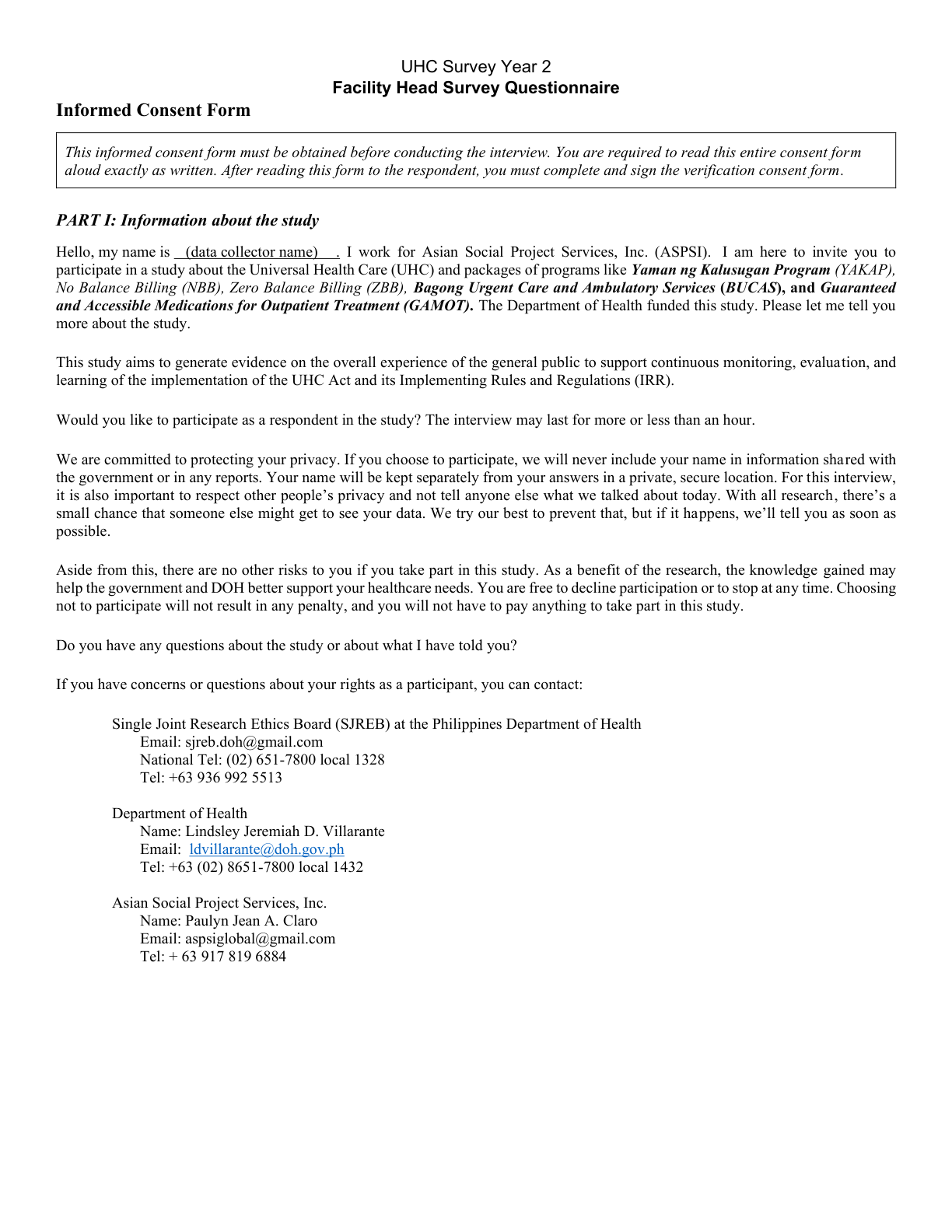
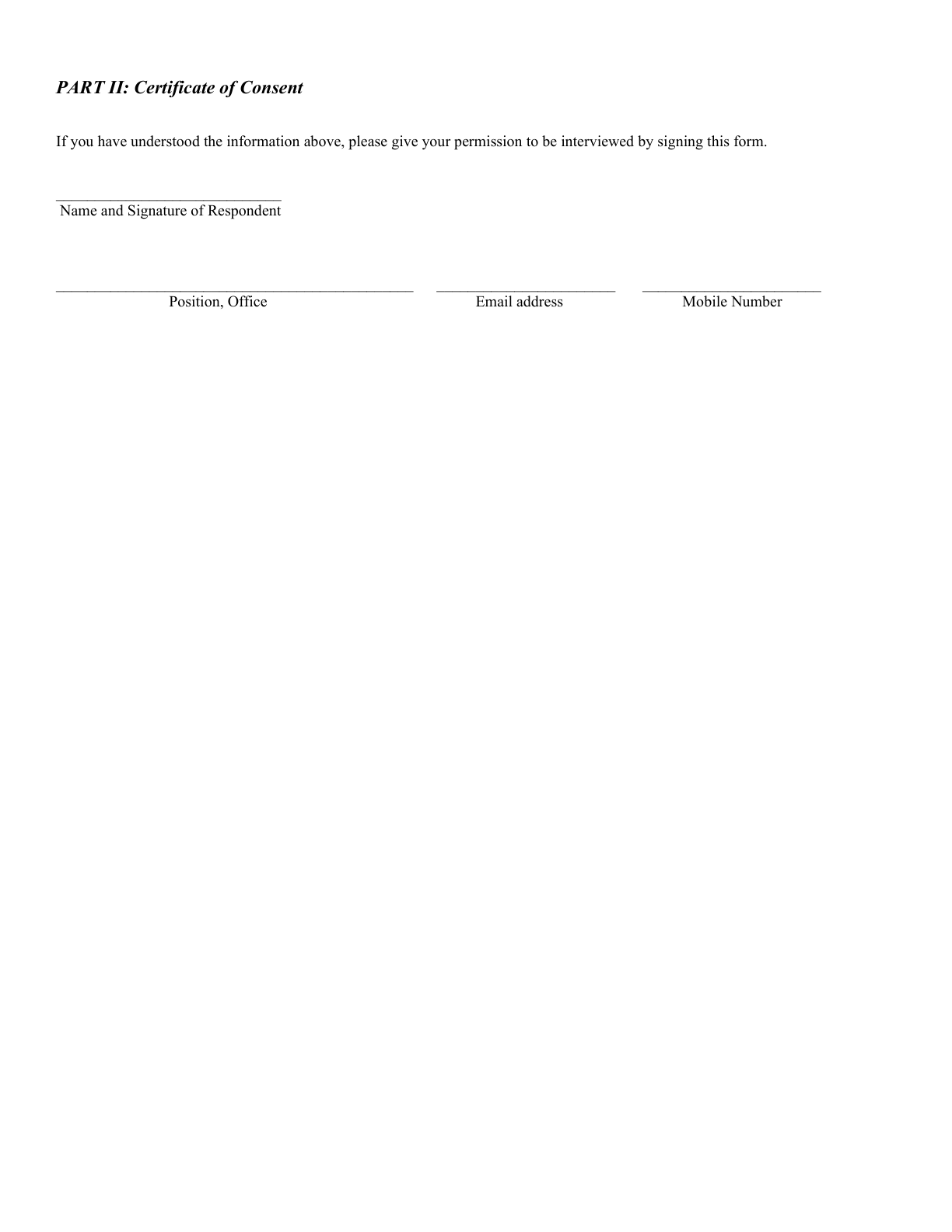
Pages 1–2 — the consent script read aloud (Part I) and the signed Certificate of Consent (Part II). Tap a page to open it full size.
The same on the tablet (CAPI)
There is no consent screen in CAPI. The consent script is read aloud from the printed SJREB consent form (kept off the tablet); the respondent's consent or refusal is then recorded on the tablet as the Result of Visit disposition in Field Control — a "Refused" result ends the case.
On paper
Questionnaire No: ____________
A blank box the enumerator writes by hand.
On the tablet (CAPI)
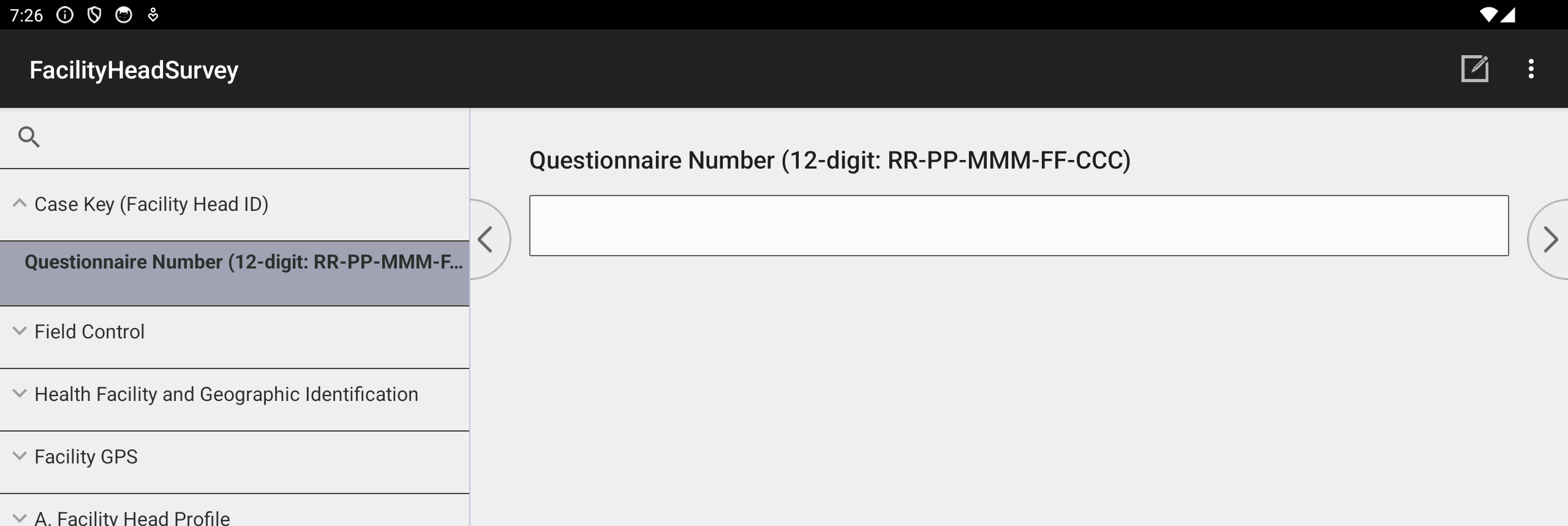
The live CSEntry screen — note the section navigation tree on the left. The 12-digit number is entered here (Region → Province/HUC → City/Municipality → Facility No. → Case sequence).
On paper
Survey Team Leader’s Name; Enumerator’s Name; Field Validated by; Field Edited by; Date First Visited; Date of Final Visit; Total number of visits; Resulta (1 Completed · 2 Postponed · 3 Refused · 4 Incomplete).
On the tablet (CAPI)
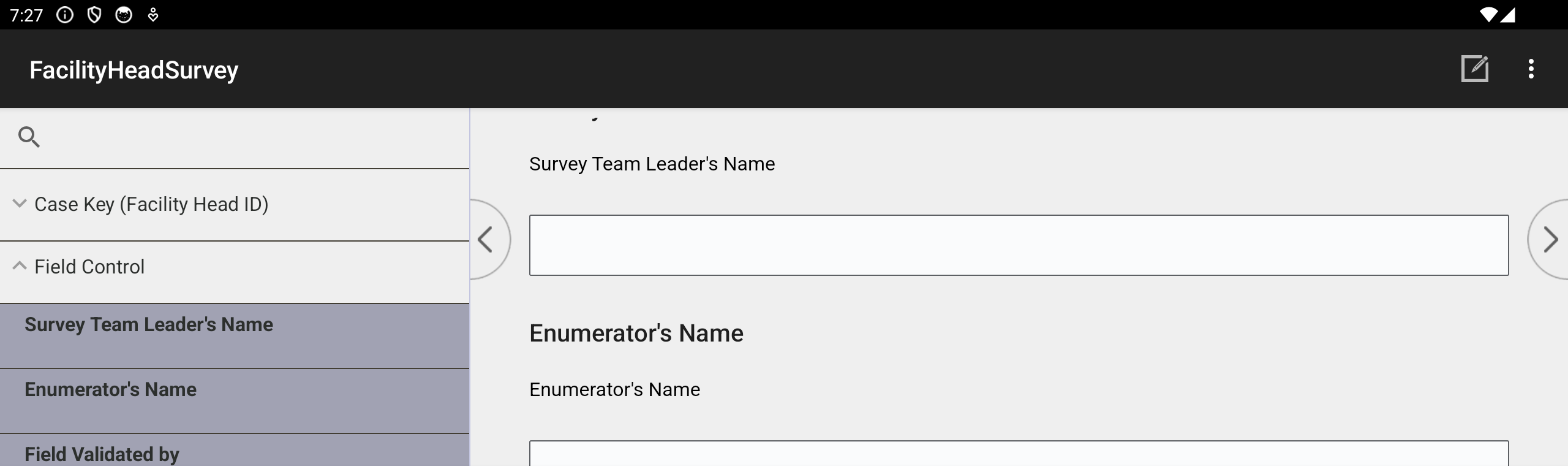
The live Field Control form — team leader and enumerator names, dates, and result, entered on screen.
On paper
Classification:
- UHC IS
- Non-UHC IS
Region · Province/HUC · City/Municipality · Barangay (written in). Location: Latitude ____ Longitude ____.
On the tablet (CAPI)
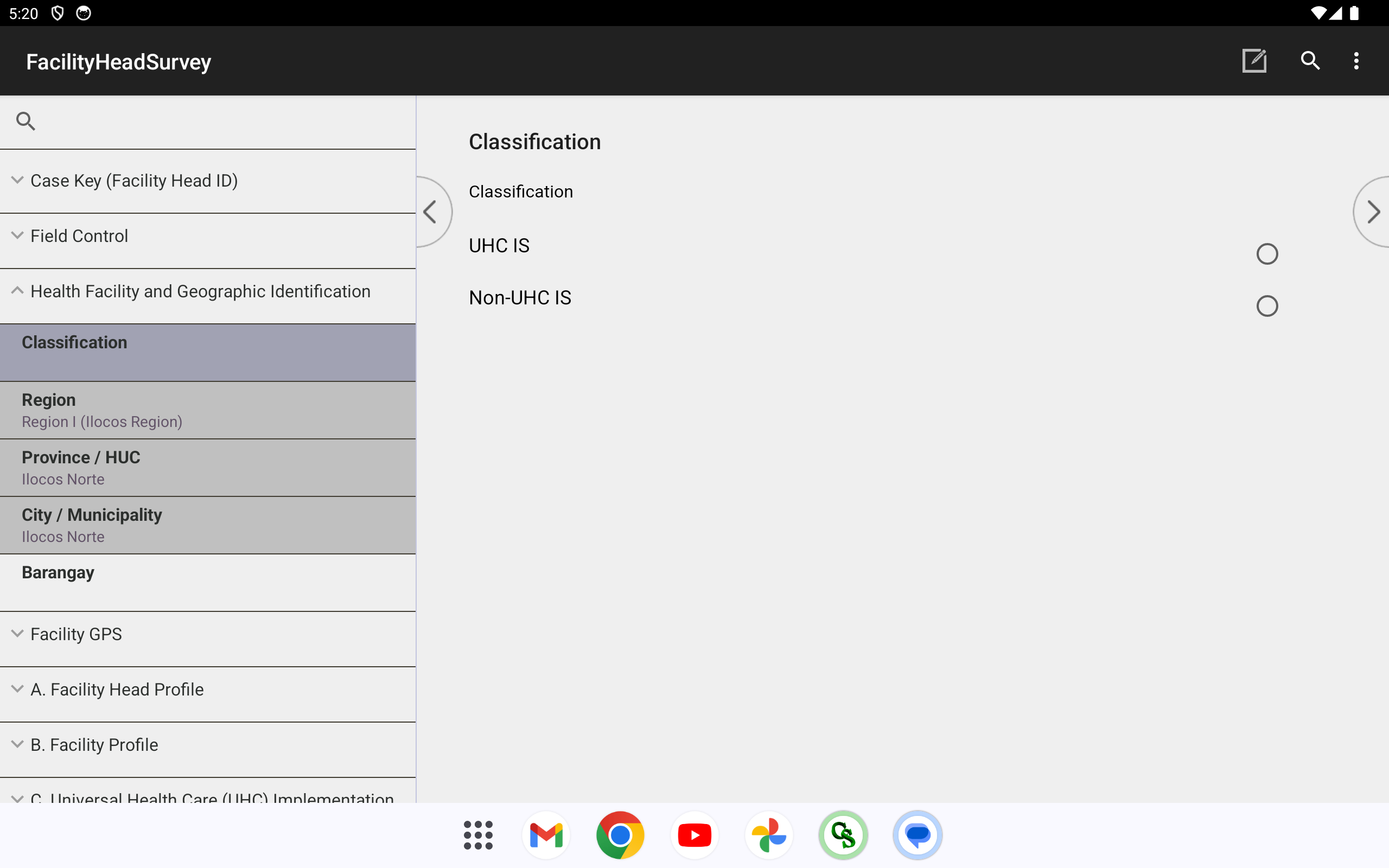
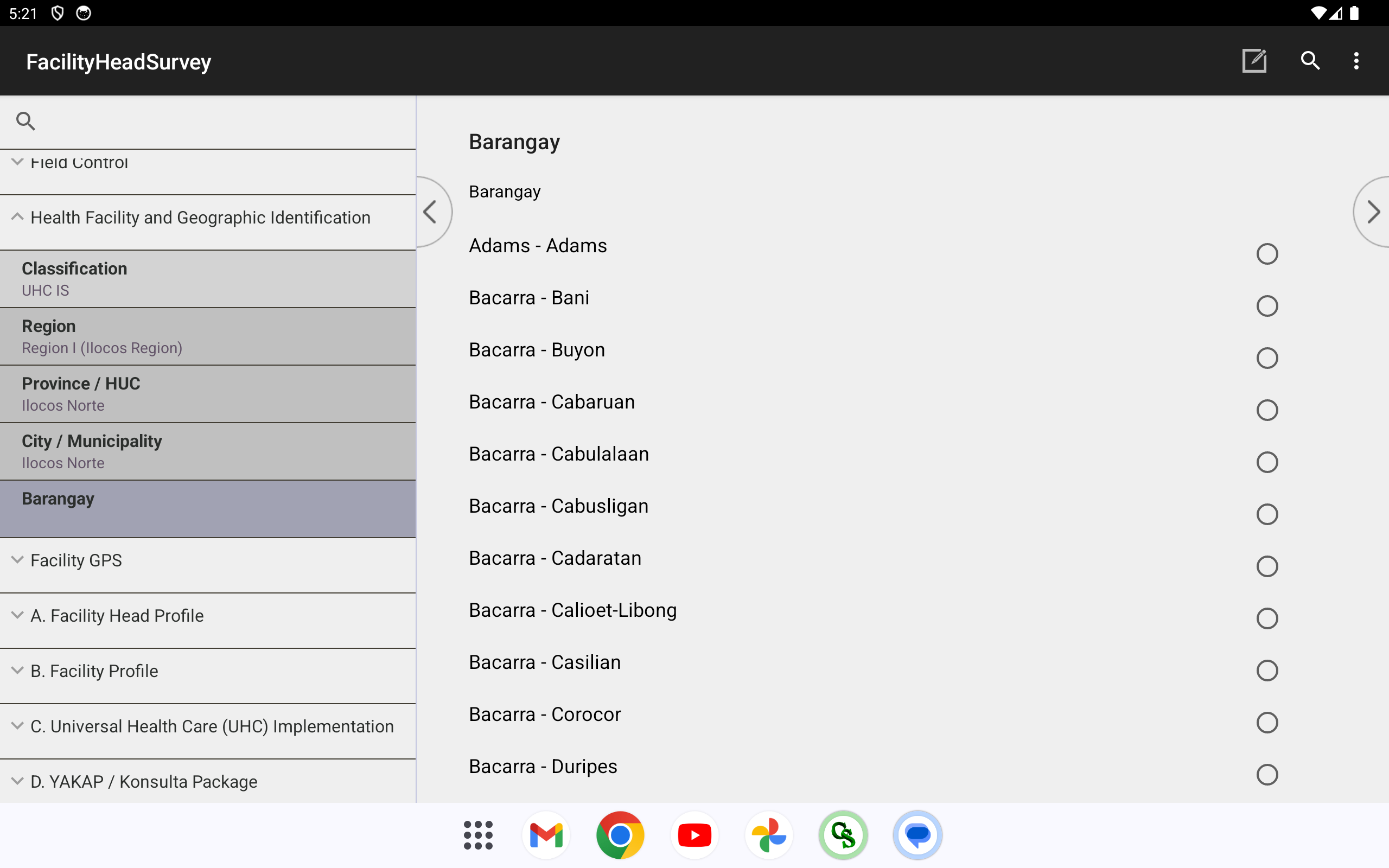
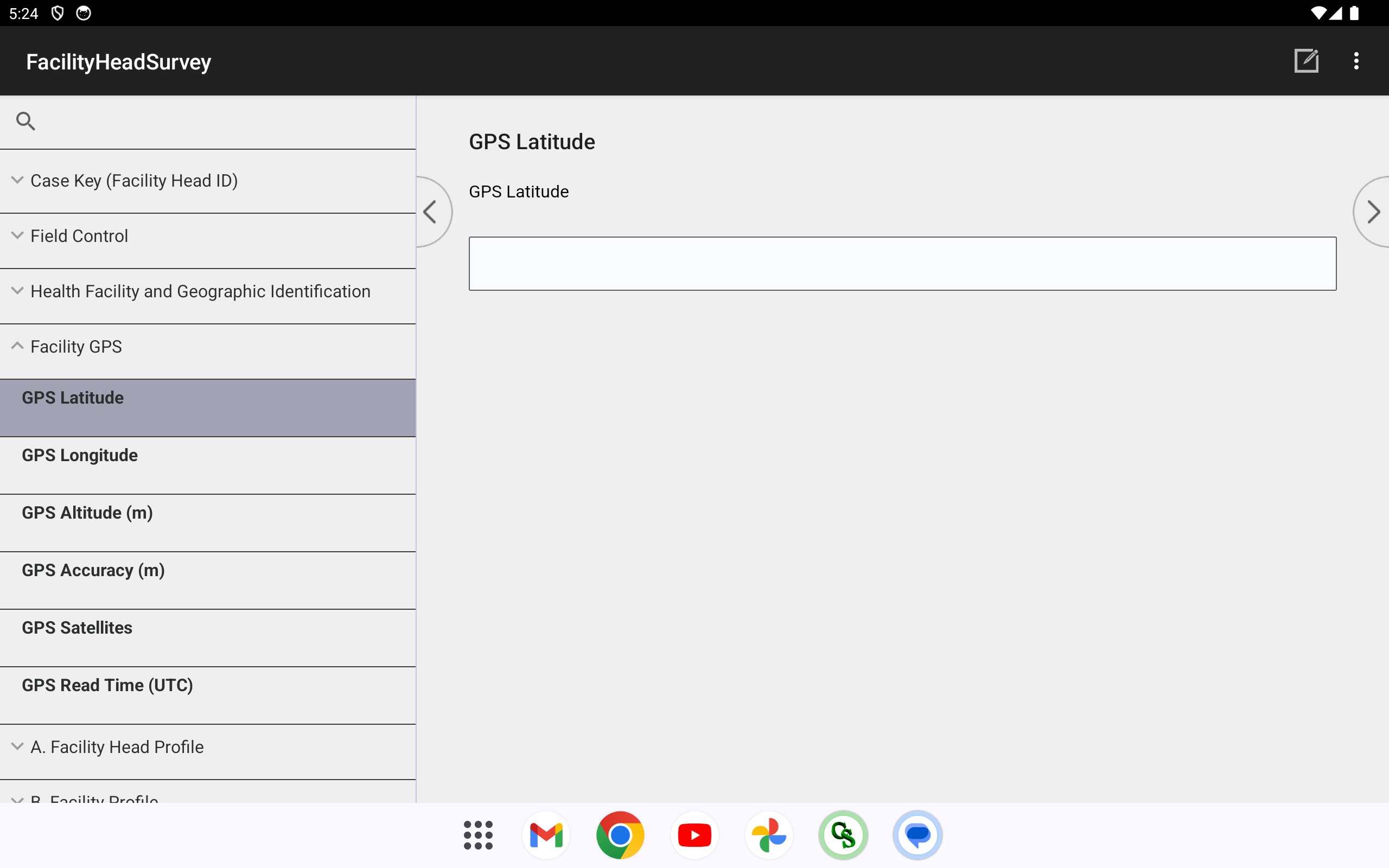
Region/Province/City/Barangay are dependent drop-downs — each choice filters the next (the PSGC cascade). The first three are pre-filled from the questionnaire number; the enumerator only picks the barangay. GPS is then captured automatically into the fields shown.
On paper
1. What is your name? (Last Name, First Name, Middle Initial, Ext)
On the tablet (CAPI)
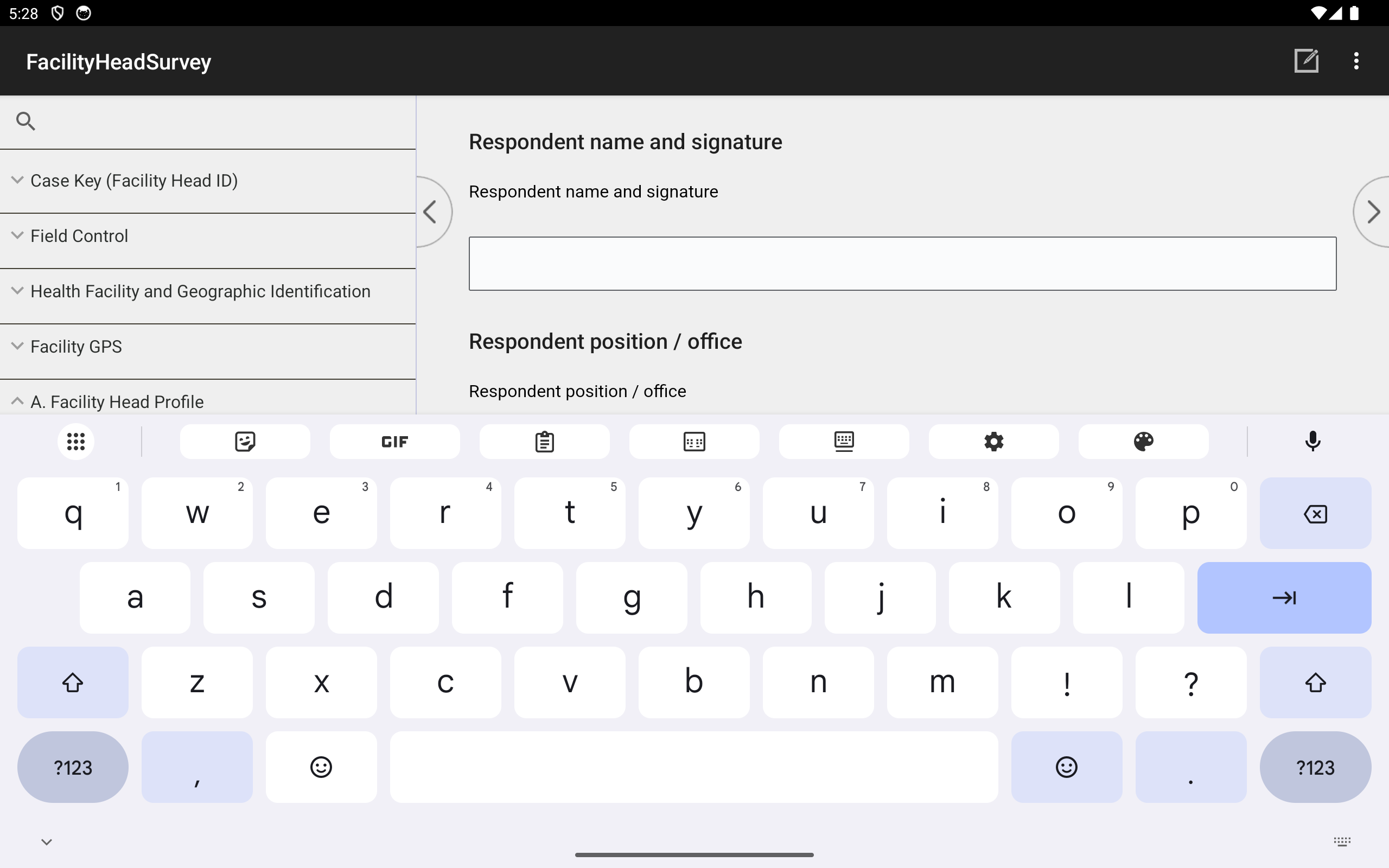
A text field with the on-screen keyboard.
On paper
2. What is your official designation at this health facility?
- Rural Health Unit / Health Center Head
- Hospital Administrator
- Administrative Officer / Assistant
- Physician · Nurse · Midwife
- Chief of Hospital
- Municipal / City Health Officer
- Medical Director · Medical Officer · Rural Health Physician
- … (full option list)
On the tablet (CAPI)
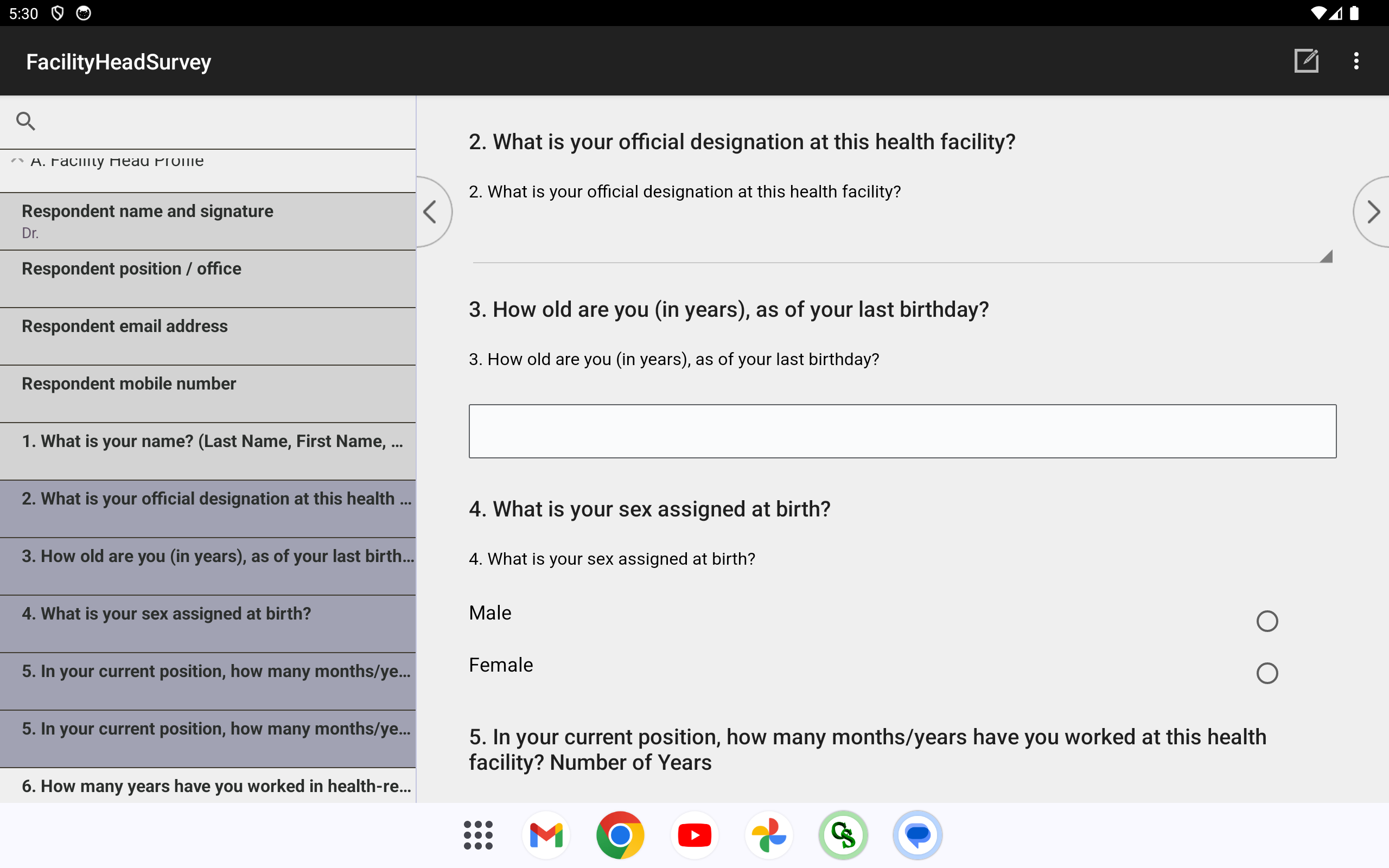
Pick one from a drop-down. (Age and sex follow on the same form, shown below.)
On paper
3. How old are you (in years), as of your last birthday?
On the tablet (CAPI)
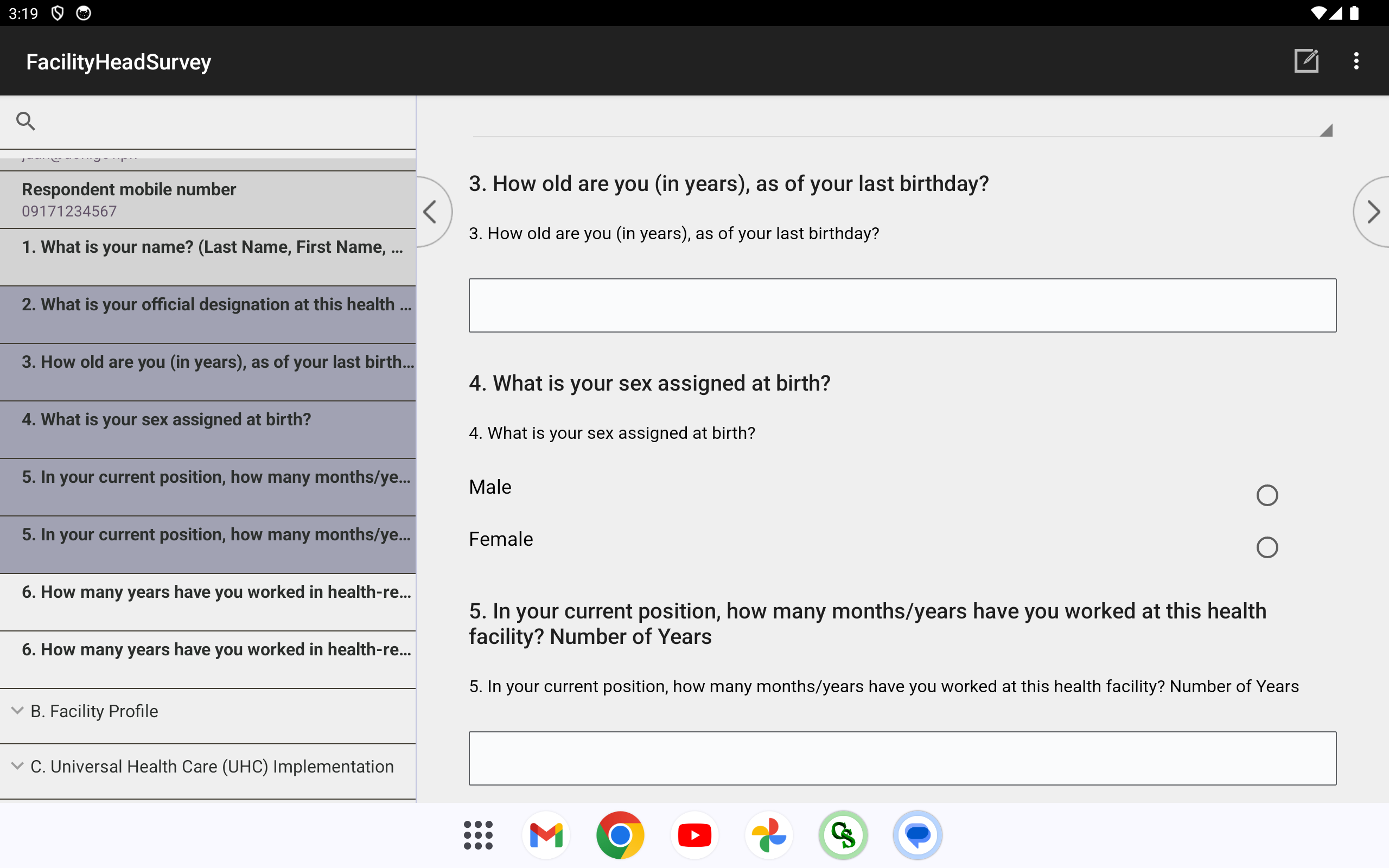
Number-pad entry. (Sex follows on the same screen, shown below.)
On paper
4. What is your sex assigned at birth?
- Male
- Female
On the tablet (CAPI)
Single-select — tap one option (Male / Female).
On paper
5. In your current position, how many months/years have you worked at this health facility? · 6. How many years have you worked in a health-related position?
Number of Years ____ Number of Months ____ (each question).
On the tablet (CAPI)
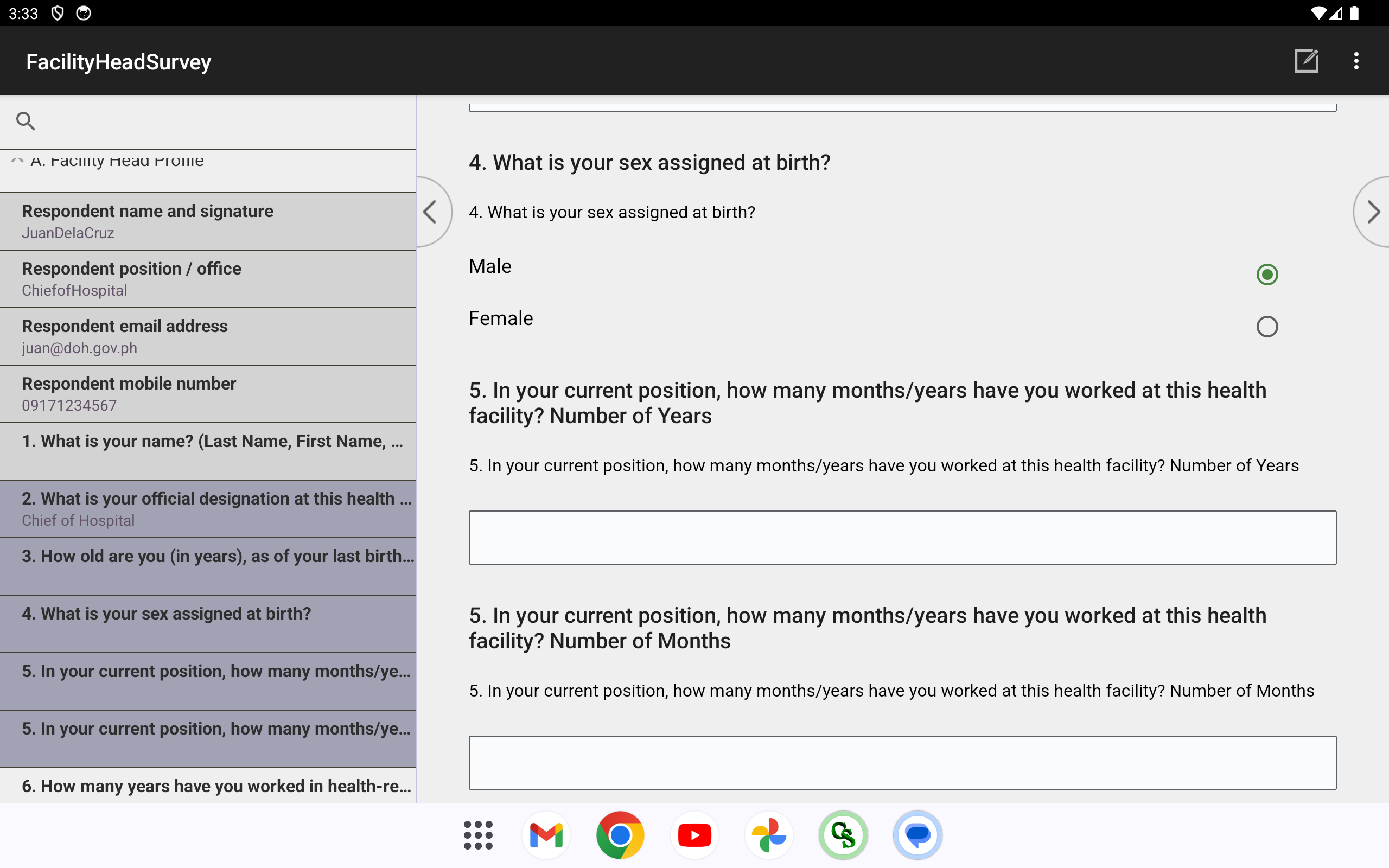
Years and months as separate number entries.
On paper
7. What type of ownership is this hospital?
- Public
- Private
On the tablet (CAPI)
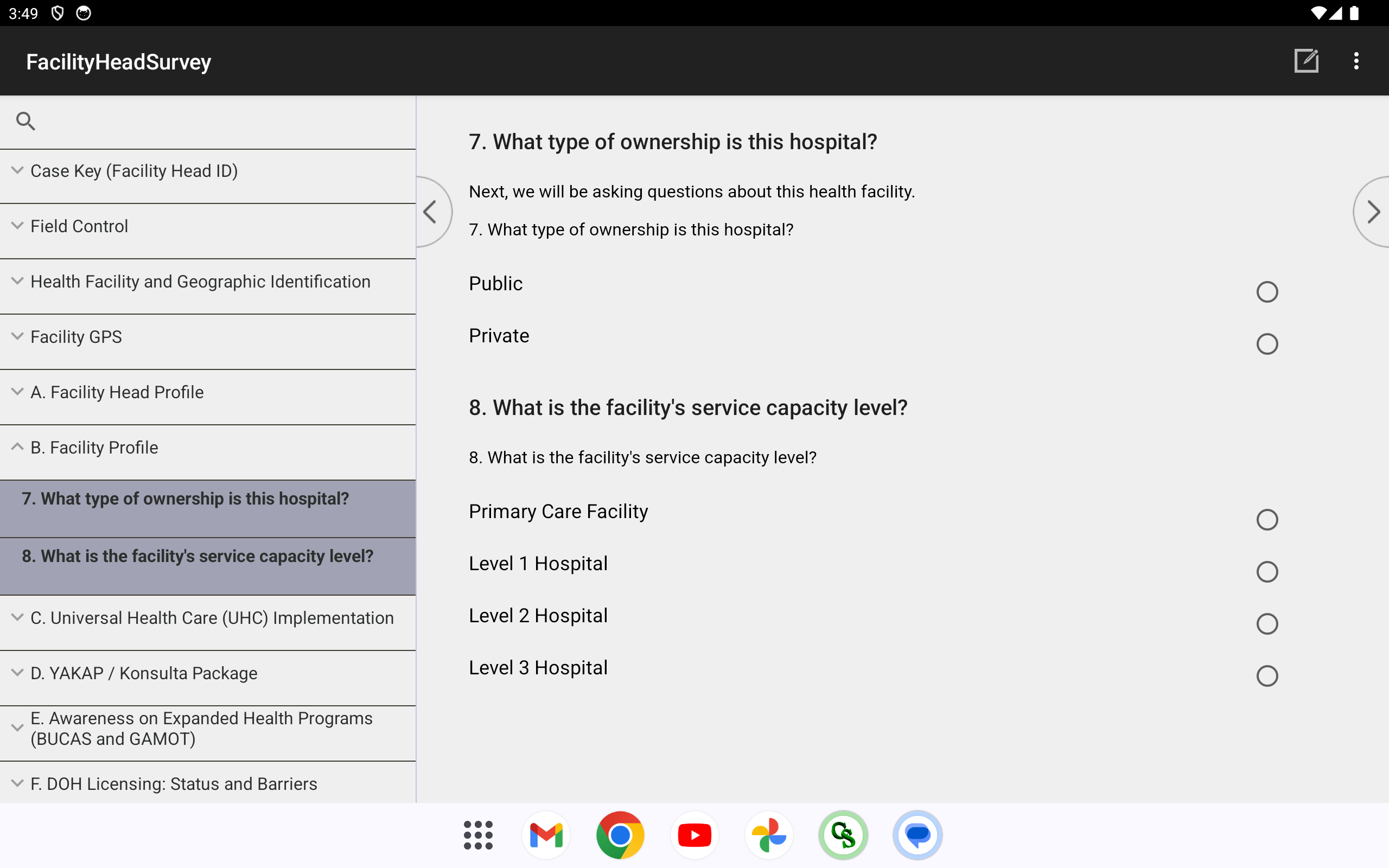
Single-select — Public / Private. (Service-capacity level follows on the same screen, shown below.)
On paper
8. What is the facility’s service capacity level?
- Primary Care Facility
- Level 1 Hospital
- Level 2 Hospital
- Level 3 Hospital
On the tablet (CAPI)
Single-select — Primary Care Facility / Level 1–3 Hospital.
The real printed page
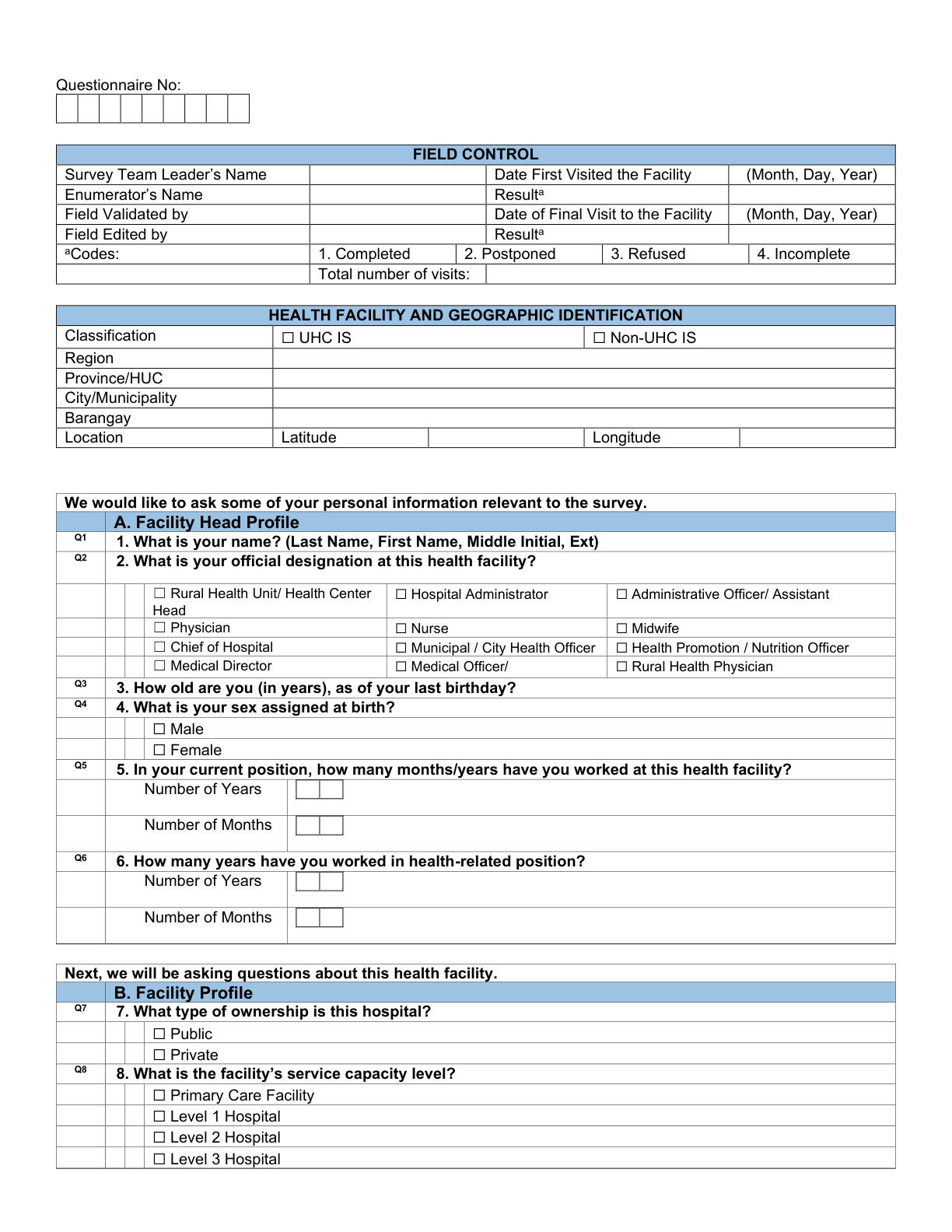
Page 3 of the printed questionnaire — Field Control, Geographic ID, Section A, and Section B. Tap to open full size.
The same on the tablet (CAPI)
The matching run of CSEntry screens on the tablet — the section tree (left) shows Field Control → Geographic ID → Section A → Section B completed, the same flow as the printed page.
On paper
9. Have you heard about Universal Health Care (UHC) prior to this survey?
- Yes
- No
10. Does the facility have primary care packages?
- Yes
- No
On the tablet (CAPI)
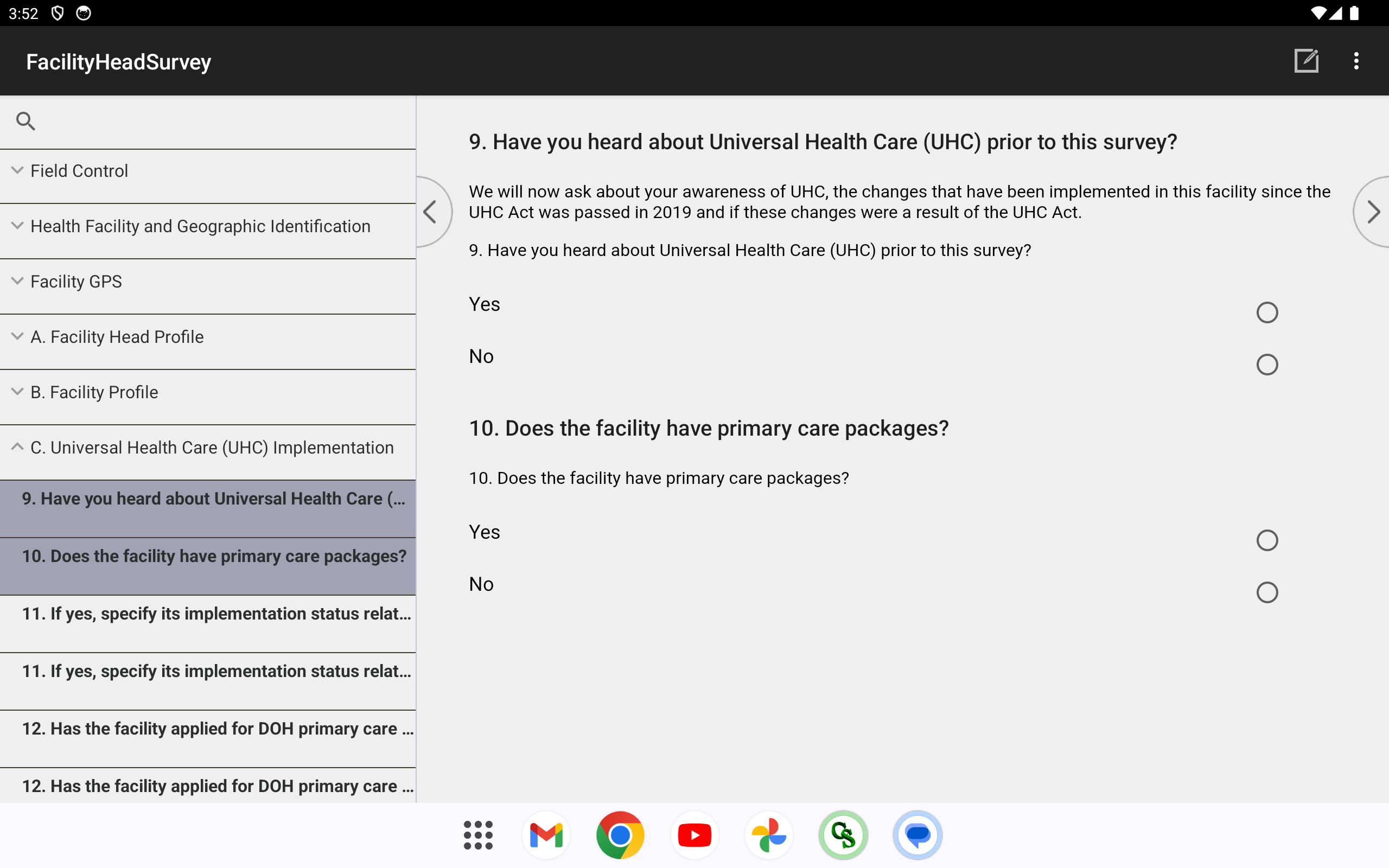
Two Yes / No single-selects on one screen — the section’s entry point.
On paper
11. If yes, specify its implementation status relative to the UHC Act.
- Implemented as a direct result of the UHC Act (i.e. YAKAP/Konsulta)
- Pre-existing prior to UHC but subsequently enhanced or expanded due to UHC Act
- Newly implemented or improved independent of UHC Act
- Not yet implemented but planned within the next 1-2 years
- Other (specify)
- I don’t know
- Not applicable
On the tablet (CAPI)
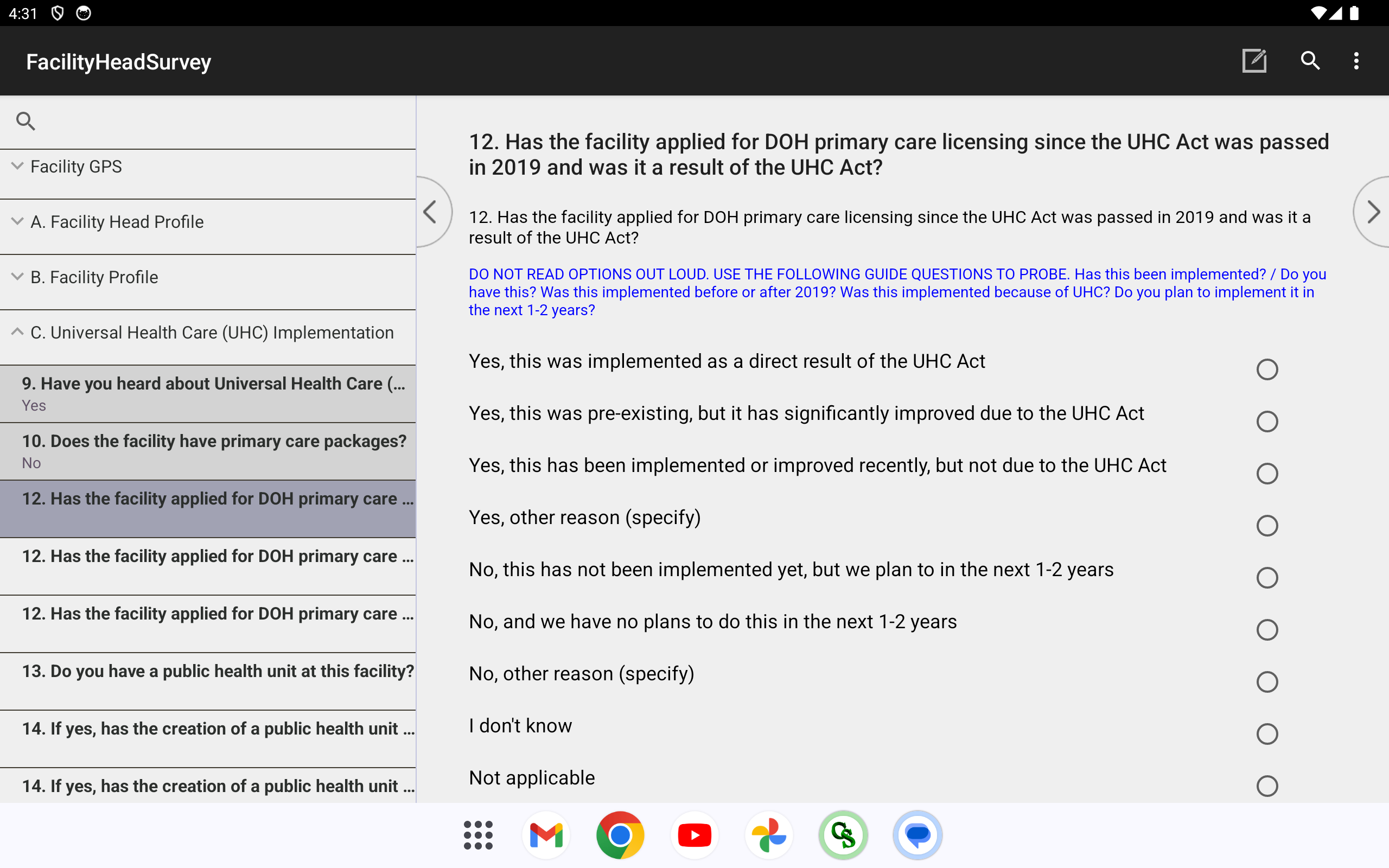
Single-select, 7 options + an “Other (specify)” text box that opens when “Other” is picked. Appears only when Q10 = Yes — otherwise the field is hidden. (Shown: the matching single-select control; this exact screen renders with Q11’s package-status options.)
On paper
13. Do you have a public health unit at this facility?
- Yes
- No
- Not applicable
16. Do you have a health promotion unit at this facility? — same Yes / No / Not applicable shape.
On the tablet (CAPI)
Yes / No / Not applicable single-select — same control as Q9/Q10 above. A “Yes” on Q13 opens the unit-creation attribution (Q14) and unit-role select (Q15); a “Yes” on Q16 opens Q17/Q18. (Shown: the matching control — the live screen carries this row’s own options.)
On paper
15. What is the main role of the public health unit?
- Health promotion and education
- Disease surveillance report
- Referral and patient navigation
- Alignment with national public health programs
- Other (specify)
- I don’t know
- Not applicable
18. Main role of the health promotion unit? — same single-select shape, with its own option list.
On the tablet (CAPI)
Single-select + “Other (specify)”, rendered like Q11 above. Each opens only when its parent unit question (Q13 / Q16) is answered “Yes”. (Shown: the matching control — the live screen carries this row’s own options.)
On paper
32. Does your facility currently submit health and financial data to the DOH Information System and/or the PhilHealth Dashboard?
- Yes, to DOH Information System only
- Yes, to PhilHealth Dashboard only
- Yes, to both DOH Information System and PhilHealth Dashboard
- No, we are not submitting these data
On the tablet (CAPI)
Single-select, 4 options — rendered like Q11 above. (Shown: the matching control — the live screen carries this row’s own options.)
On paper
33. If yes, how frequent has your facility submit these data?
- Weekly
- Monthly
- Quarterly
- Semi-annually
- Annually
- Other (specify)
On the tablet (CAPI)
Single-select + “Other (specify)” text box. Opens only when Q32 is any “Yes”. (Shown: the matching control — the live screen carries this row’s own options.)
On paper
34. Which of the submitted reports are actually used for decision-making?
- OPD/IPD census and morbidity reports
- Maternal, newborn, child, and adolescent health (MNCAH) reports
- Notifiable diseases / surveillance reports
- Expenditure and budget utilization reports
- PhilHealth claims and reimbursement reports
- YAKAP/Konsulta utilization reports
- … and 6 more, incl. “Other (specify)”
On the tablet (CAPI)
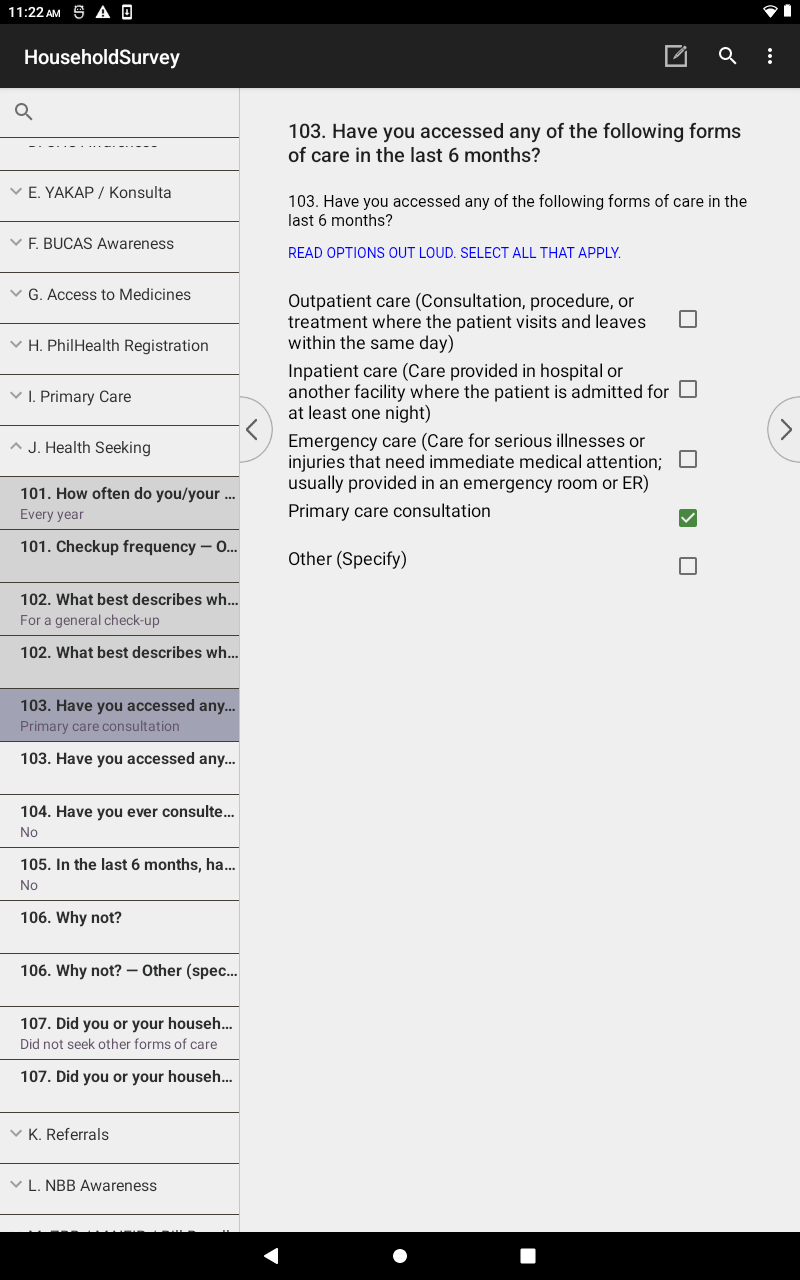
Check-box multi-select — tick all that apply, on one screen. A real CAPI difference: on paper this is a free list of boxes; in CAPI it’s one true multi-select field with mutually-exclusive “I don’t know” / “Other” rules enforced on the spot.
On paper
35. Have there been changes in the facility staffing since 2019?
- Yes
- No
37. Have there been changes in the referral system since 2019? — same Yes / No shape.
On the tablet (CAPI)
Yes / No single-select. A “Yes” opens its matching attribution question — Q35 → Q36 (staffing), Q37 → Q38 (referral) — both in the pattern below. (Shown: the matching control — the live screen carries this row’s own options.)
On paper
49. What are the major challenges to improving the quality of patient care in your local area? · 50. … the accessibility of patient care?
- Limited resources (personnel, equipment, supplies, funding)
- Challenging quality standards
- Healthcare decisions made by LGUs not the facility
- Lack of specific healthcare skills
- … and 6 more, incl. “I don’t know” / “Other (specify)”
On the tablet (CAPI)
Both use the same 10-option check-box multi-select (quality vs. accessibility). “I don’t know” and “Other” are mutually exclusive with the rest.
The real printed page
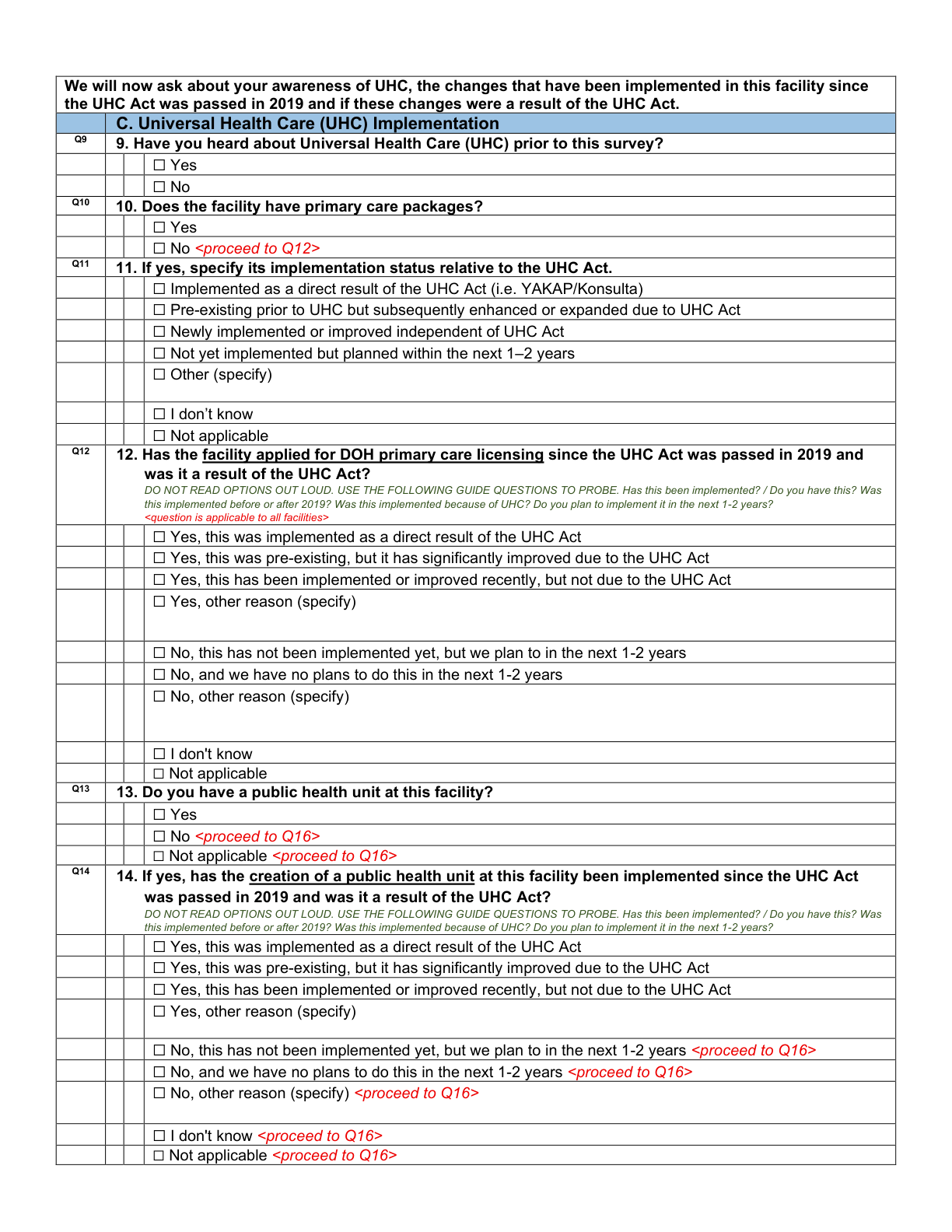
Page 4 — the opening of Section C (Q9–Q14). The section runs across printed pages 4–12; tap to open this page full size.
The same on the tablet (CAPI)
The same section on the tablet — the left-hand tree shows “C. Universal Health Care (UHC) Implementation” open, the run of C screens flowing one question at a time.
On paper
52. If yes, since when? Month __ / Year ____ · 53. Which services are in the YAKAP/Konsulta package? · 54–56. Can you register individuals / whole families / only both together? · 57. Capitation amount of the package?
- Q53 (package): Pap smear, Mammogram, Lipid profile, Chest X-ray … + “All of the above” / “Other”
On the tablet (CAPI)
Mixed controls (shown: the number-pad, used for the Q52 date and Q57 capitation amount). All appear only when Q51 = Yes. Q53 is a check-box multi-select (see the pattern below); Q54–Q56 are Yes / No / Don’t-know single-selects.
On paper
58. Performance indicators for the 2nd tranche? · 59. Do you know how often payments arrive? · 60. How often should you be paid? · 61. Delays in tranches? (+ reasons) · 62. Typical interval between tranches? · 63. Days waited for accreditation? · 64. Why did you apply?
- Q60 frequency: Monthly · Quarterly · Semi-annually · Annually
On the tablet (CAPI)
Single-selects for the frequency/interval/wait buckets (shown). All in the Q51 = Yes branch. Q59/Q61 are Yes / No gates, Q61.1 a free-text reason, and Q58 & Q64 are check-box multi-selects (pattern below).
On paper
75. Whose responsibility is it to enroll patients? · 76. Which enrollment initiatives do you run? · 77. Any challenges enrolling patients? · 78. What challenges?
On the tablet (CAPI)
Check-box multi-selects for Q75/Q76/Q78 (like Q34, Section C), gated by a Yes / No on Q77. (Shown: the matching control — the live screen carries this row’s own options.)
On paper
79. Why are you not accredited? · 80. Are you intending to become a provider? · 81. Would you know how to start? · 82–84. Deciding factor / what went wrong / process challenges.
- Q80: Yes, already in process · Yes, not yet · No, decided not to · No, tried and failed · No, haven’t thought about it · I don’t know
On the tablet (CAPI)
Reached only when Q51 = No. Shown: the single-select control used for Q80 (intent). The row also has a check-box multi-select (Q79), a Yes / No (Q81), and free-text boxes (Q82–Q84).
On paper
85. What is the facility’s catchment area? · 86. How many patients in it are eligible to register? · 87. How many eligible patients are already registered?
On the tablet (CAPI)
Asked of everyone. Shown: two number-pad entries (the Q86 eligible and Q87 registered counts render like these); Q85 catchment is free-text. The app blocks entry if Q87 > Q86 — see the validation note below.
On paper
88. Is the Php 1,700 per-capita rate enough? · 89. Did you do a costing exercise? · 90. Did it show Php 1,700 was viable? · 91–92. Minimum acceptable capitation value (as a provider / to consider becoming one).
- Q88–Q90: Yes · No · I don’t know
On the tablet (CAPI)
Asked of everyone. Shown: the Yes / No / Don’t-know single-select control (Q88–Q90). Q91/Q92 are two number-pad peso amounts.
On paper
93. Charge additional capitation fees? → 94. Why? · 95. Already received payments? → 96. Why not? · 97. Challenges getting payments? → 98. What challenges? · 99. What would you expand next? → 100. Additional features.
On the tablet (CAPI)
Asked of everyone. A run of gate → detail pairs (shown: the single-select gate control): a Yes / No or single-select opens a check-box multi-select of reasons (Q94, Q96, Q98, Q99), closing with a free-text Q100. Each detail field appears only when its gate is answered.
The real printed page
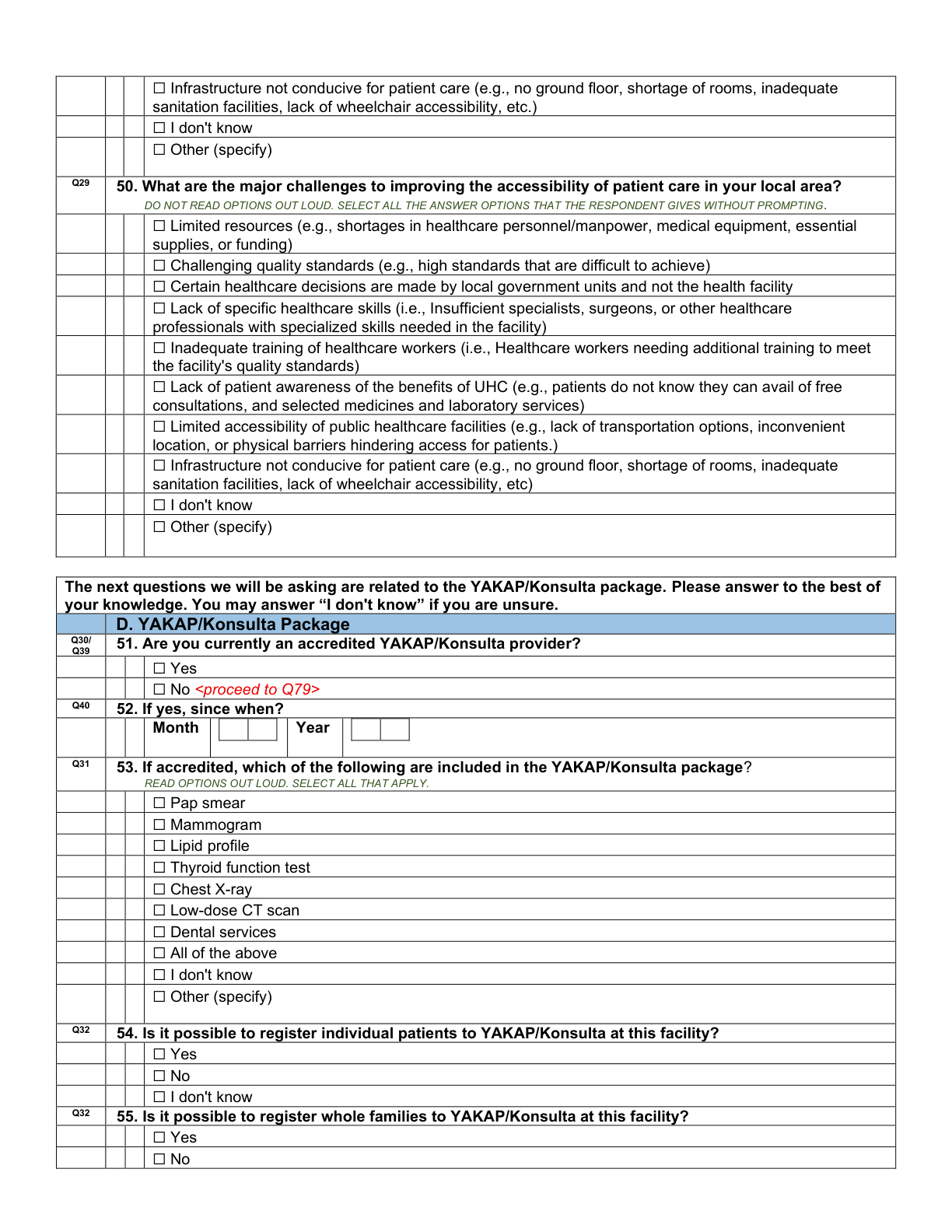
Page 12 — the start of Section D, with the Q51 accreditation gate that forks the section. Section D runs across printed pages 12–18; tap to open full size.
The same on the tablet (CAPI)
The Q51 accreditation gate (shown as the Yes/No control) opens Section D and forks it into the accredited / non-accredited branches; every control type used in D is already shown live in Sections A–C above.
On paper
101. Have you heard about the Bagong Urgent Care and Ambulatory Service (BUCAS)? · 102. Do you have a BUCAS Center?
- Q101: Yes · No
- Q102: Yes · No · I don’t know
On the tablet (CAPI)
Yes / No single-selects (Q102 adds “I don’t know”). A “No / Don’t know” on Q102 opens Q103 (the reason field).
On paper
103. If none, what is the primary reason?
- Proposal not yet submitted
- Limited information on establishment process
- Did not meet standard requirements
- Awaiting assessment or approval
- Other (specify) · Not applicable
On the tablet (CAPI)
Single-select + “Other (specify)” text. Appears only when the facility has no BUCAS center (Q102 ≠ Yes); otherwise hidden.
On paper
104. What services does your BUCAS Center offer? · 105. Main factors affecting BUCAS utilization?
- Q104: Urgent care · Minor surgery · Diagnostics/lab · Reproductive & special health · Other
- Q105: Patient awareness · Location/access · Referral patterns · PhilHealth coverage · Staff/services · Other
On the tablet (CAPI)
Check-box multi-select (tick all that apply) — same control flagged at Q34, Section C. Both appear only when a BUCAS center exists (Q102 = Yes).
On paper
106. What resources do you need to sustain the BUCAS center? · 107. Does the BUCAS Center decongest your facility of patients?
On the tablet (CAPI)
Q106 is a free-text field (shown); Q107 is a Yes / No single-select.
On paper
108. Have you heard about the GAMOT (Guaranteed and Accessible Medications for Outpatient Treatment) package? · 109. Is your facility an accredited GAMOT provider?
- Yes · No (each)
On the tablet (CAPI)
Yes / No single-selects. A “No” on Q109 opens Q110 (the reason field).
On paper
110. If not accredited, what is the primary reason? · 111. Main factors affecting GAMOT utilization?
- Q110: Application not yet submitted · Limited info on process · Did not meet requirements · Awaiting approval · Other · N/A
On the tablet (CAPI)
Q110 is a single-select + “Other” (shown), opening only when Q109 = No. Q111 is a check-box multi-select (same control flagged at Q34).
On paper
112. In the past 3 months, any stock-out of tracer essential medicines? · 113. Which medicines? · 114. How many days did it last? · 115. On average, how many months? · 116. Did you do anything to address it?
- Q114: <30 days · 31–60 days · >60 days
- Q116: Yes · No · Did not experience stock-outs
On the tablet (CAPI)
Q112 is a Yes / No, Q113 a free-text medicine list, and Q114–Q116 are single-selects (shown). Q113–Q116 open only when Q112 = Yes (a stock-out occurred).
On paper
117. If yes, what did you do to address the medicine stock-outs?
- Resorted to alternative procurement
- Active inventory monitoring
- Improve forecasting and quantification
- Other (specify)
On the tablet (CAPI)
Check-box multi-select (same control flagged at Q34). Appears only when Q116 = Yes (the facility addressed the stock-out).
The real printed page
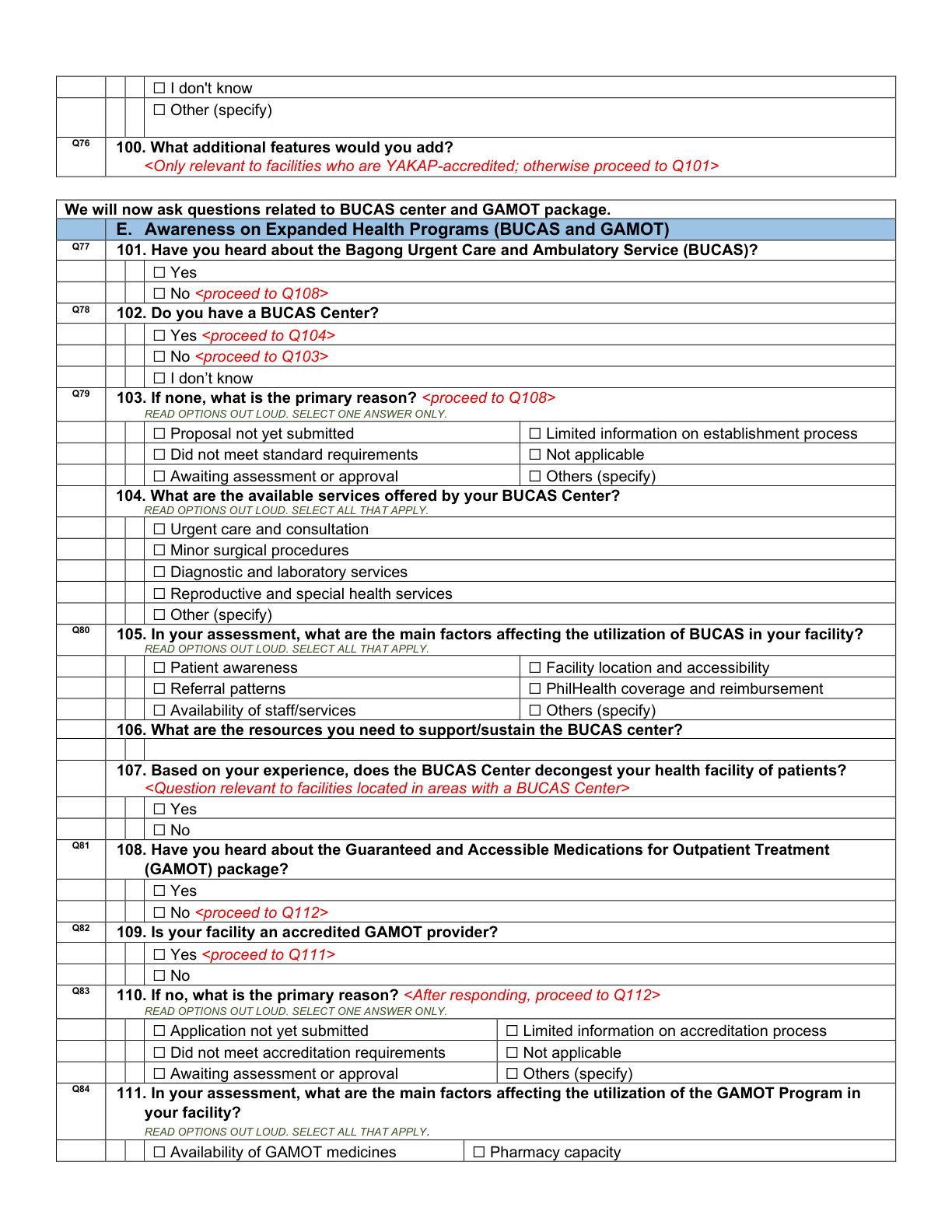
Page 19 — the opening of Section E (BUCAS Q101–Q107 and the start of GAMOT). The section spans printed pages 19–20; tap to open full size.
The same on the tablet (CAPI)
Section E opens with the BUCAS / GAMOT awareness Yes/No questions — the same single-select control shown here. The check-box control is shown from a live capture (CSEntry renders it identically across instruments).
On paper
118. Is this facility DOH licensed? · 119. When did you receive your DOH license? · 120. How many days did it take?
- Q118: Yes · No · No, but submitted & waiting · Don’t know what DOH licensing is
- Q120: <30 days · 31–60 days · >60 days
On the tablet (CAPI)
Single-selects (shown). Q118 is the gate: Q119–Q120 open only when the facility is licensed (or licensing is in progress).
On paper
121. Which requirements were difficult to comply with in the DOH licensing process?
- Patient rights & ethics · Patient care · Leadership · HR management · Information management · Safe practice · Performance · Physical plant · Equipment …
- Hospital-only: National laws & DOH issuances · Emergency cart contents · Add-on services
- Primary-care-only: Public access to price information
- None of the above
On the tablet (CAPI)
Check-box multi-select (same control flagged at Q34).
The real printed page
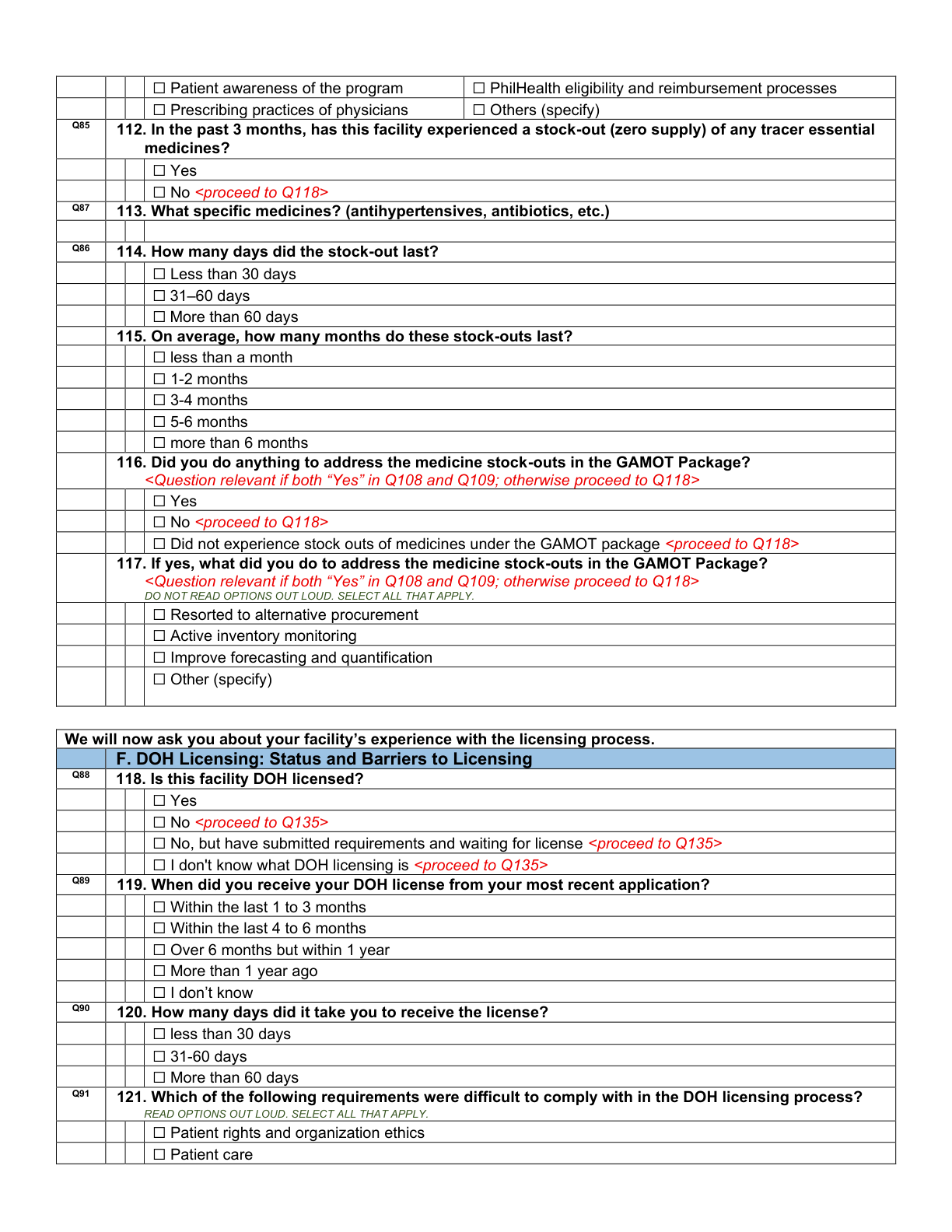
Page 20 — the licensing-status questions (Q118–Q121) that open Section F. The thirteen “why difficult” follow-ups (Q122–Q134) run across printed pages 20–24; tap to open full size.
The same on the tablet (CAPI)
Section F opens with the licensing single-selects (shown). The thirteen “why difficult” follow-ups are check-box lists — the check-box control is shown from a live capture (it renders identically across instruments).
On paper
135–137. Do you implement No Balance Billing? For all patients? Barriers? · 138–140. The same three for Zero Balance Billing.
- Q135/136/138/139: Yes · No
On the tablet (CAPI)
Parallel Yes / No pairs (shown) for NBB and ZBB; each opens a check-box barriers list (Q137/Q140, same control flagged at Q34). The barriers list opens regardless, so respondents can flag barriers even where the policy is in place.
On paper
141. Does the facility allow out-of-pocket (OOP) expenses for basic accommodation? · 142. Why?
On the tablet (CAPI)
Q141 is a Yes / No (shown). A “Yes” opens the free-text reason (Q142).
On paper
143. Which UHC benefit is most difficult to implement? · 144. Why is it difficult?
- Q143: PhilHealth/financial protection · Health care provider networks · HR-for-health reforms · Other
On the tablet (CAPI)
Q143 is a single-select + “Other” (shown); Q144 is a check-box reasons list (same control flagged at Q34).
On paper
145. Has the facility been providing medical social welfare (Malasakit Centers, MAIFIP)? · 146. Why? · 147. Why not?
On the tablet (CAPI)
Q145 is a Yes / No (shown) that branches: a “Yes” opens the “why” check-box (Q146), a “No” opens the “why not” check-box (Q147) — only one path appears.
On paper
148. Do you receive LGU support to implement UHC reforms? · 149. What forms? · 150. Satisfied with it? · 151. Why not?
- Q149: Financial · Technical · Medical supplies/equipment · Manpower · Other
On the tablet (CAPI)
Yes / No gates (shown) for Q148/Q150, each opening a check-box list (Q149 forms of support; Q151 why-not). The Q149 list appears only when Q148 = Yes; Q151 only when Q150 = No.
On paper
152. How clear are the protocols on which decisions need PHO approval vs. facility-level? · 153. Which protocol is unclear?
- Very Clear · Clear · Neither · Unclear · Very Unclear
On the tablet (CAPI)
5-point rating scale (Very Clear → Very Unclear), rendered as a single-select vertical list (shown). Q153 is a free-text follow-up.
On paper
154. In the past 6 months, how many patients did you refer to a higher-level facility? · 155. How do you send referrals? · 156. What referral form do you use?
- Q155/156: Physical slip · E-referral · Phone call · DOH/facility/LGU form · Other
On the tablet (CAPI)
Q154 is a number-pad count (shown); Q155/Q156 are check-box lists of referral methods/forms (same control flagged at Q34).
On paper
157. Do you have a specialist network to refer to? · 158. Proportion referred-in vs. walk-in? · 159. How do you receive referrals? · 160. Where do patients go for services you don’t offer?
- Q158: Almost all referred → almost all walk-in (5-band scale) · Unsure
On the tablet (CAPI)
Single-selects (shown) for Q157/Q158/Q160; Q159 is a check-box list of inbound referral methods (same control flagged at Q34).
On paper
161. How would you rate your satisfaction with your current referral system? · 162. Why are you not satisfied?
- Very Satisfied · Satisfied · Neither · Dissatisfied · Very Dissatisfied
On the tablet (CAPI)
5-point satisfaction scale (shown). A “Dissatisfied / Very Dissatisfied” opens Q162, a check-box list of reasons (same control flagged at Q34).
The real printed page
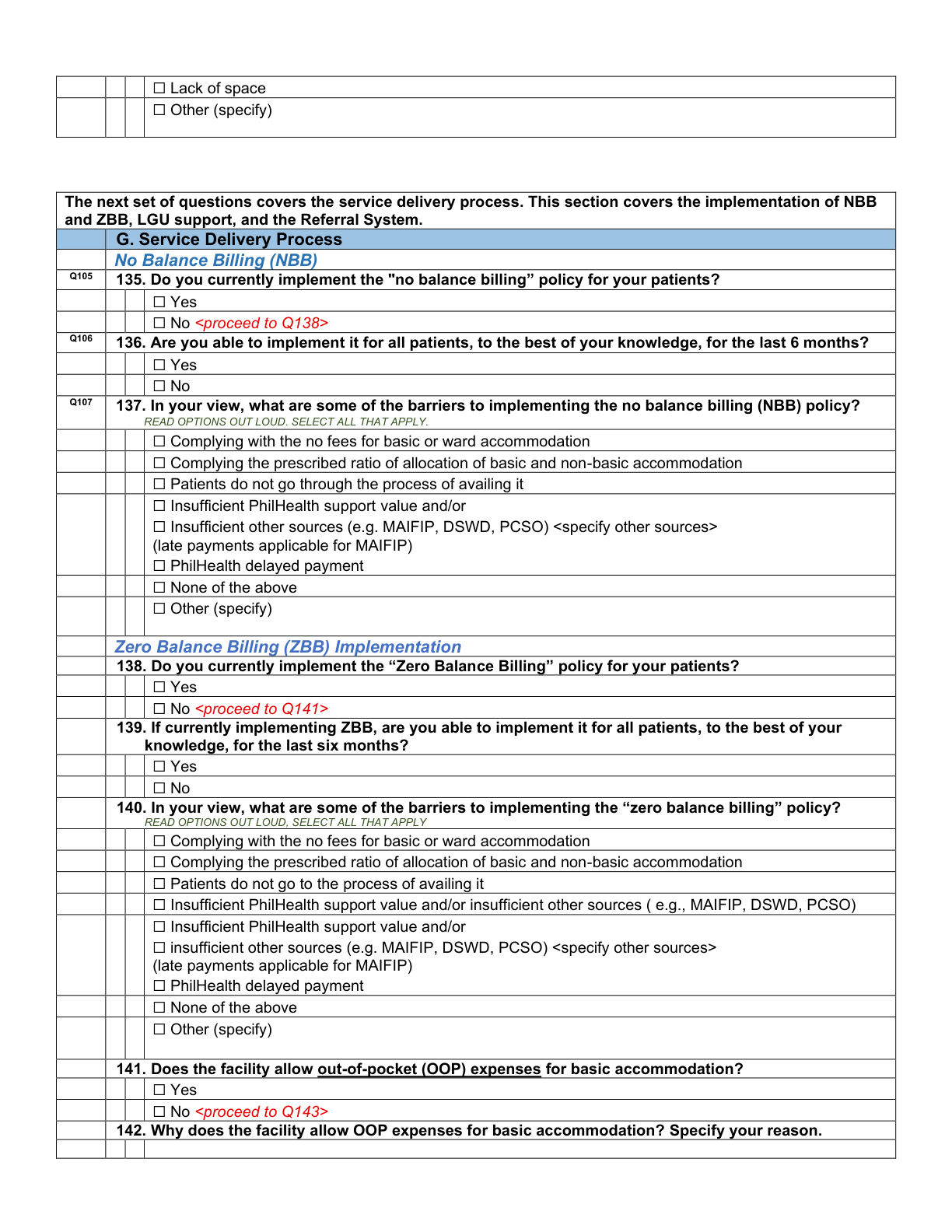
Page 25 — the opening of Section G with the No/Zero Balance Billing questions. The section runs across printed pages 25–28; tap to open full size.
The same on the tablet (CAPI)
Section G mixes Yes/No gates, single-selects, two 5-point rating scales (shown), a referral count, and check-box lists — the check-box control is shown from a live capture (it renders identically across instruments).
On paper
163. What challenges in human resources do you have? · 164. What area has the most room for improvement in your staff?
- Q163: Understaffing · Skills mismatch / lack of skills · Retention / high turnover · I don’t know · Other
On the tablet (CAPI)
Q163 is a check-box multi-select (same control flagged at Q34); Q164 is a free-text field (shown).
On paper
165. What professional development do you provide to your doctors? · 166. … to your nurses?
- Clinical audits · Surgical audits (doctors only)
- QA meetings · Seminars/conferences/workshops · Scholarships · Research grants · LGU/DOH workshops · None provided · Other
On the tablet (CAPI)
Both are check-box multi-selects (same control flagged at Q34).
The real printed page
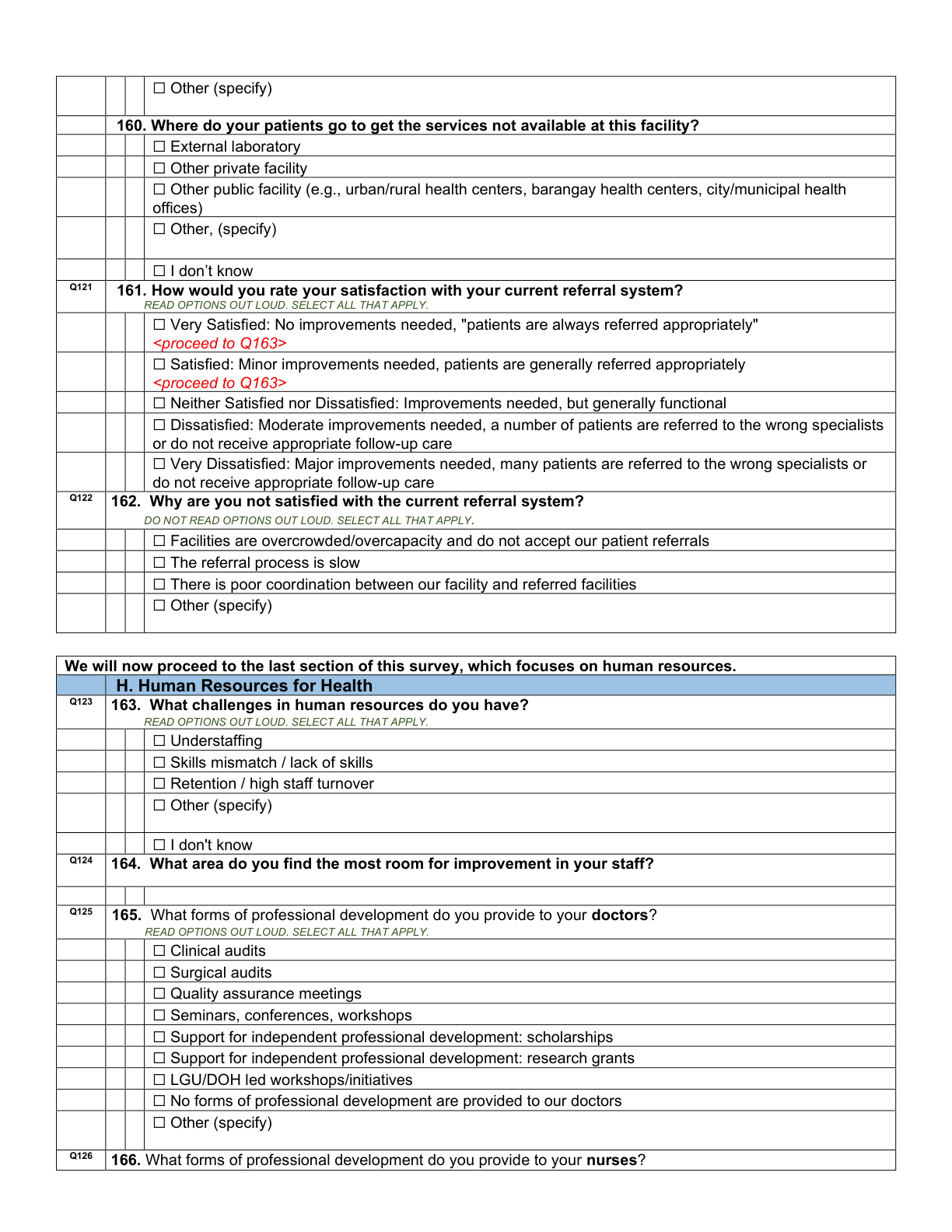
Page 28 — Section H, Human Resources for Health (Q163–Q166), closing the interviewer questionnaire on printed pages 28–29; tap to open full size.
The same on the tablet (CAPI)
Section H closes the questionnaire with a free-text field (shown) and check-box lists — the check-box control is shown from a live capture (it renders identically across instruments).